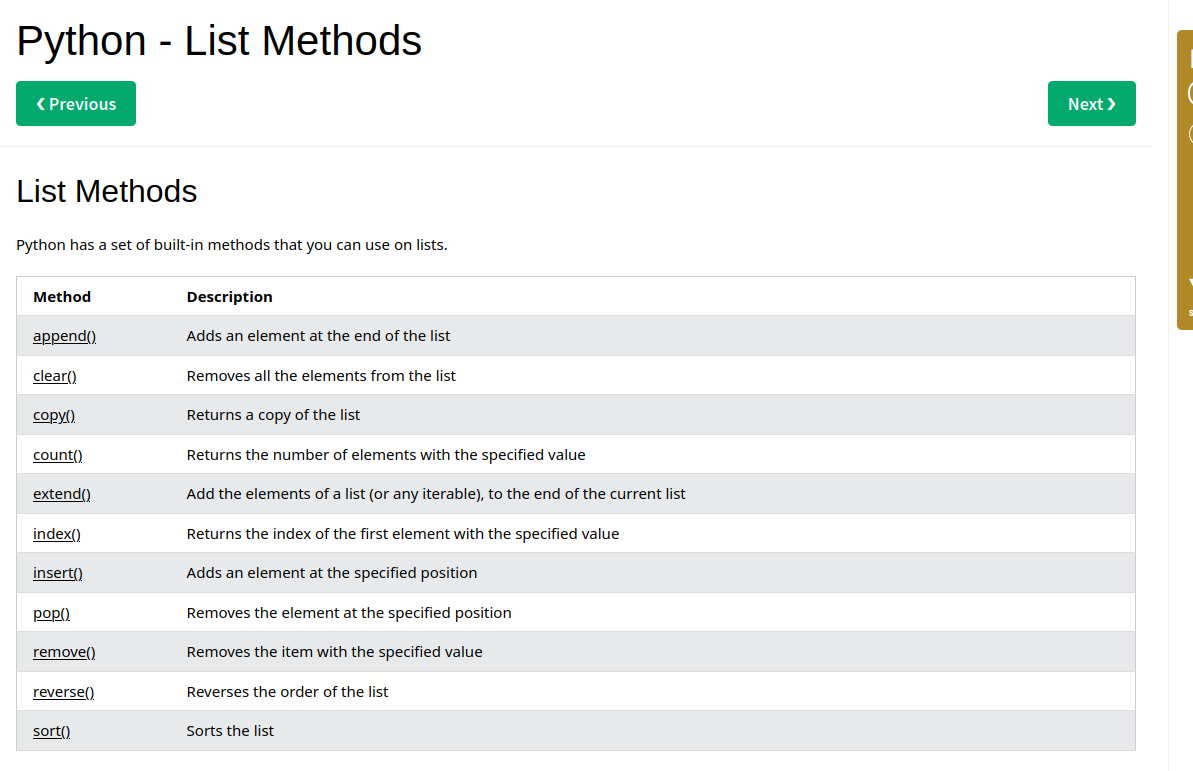
Lists are used to store multiple items in a single variable
thislist= ['apple','banana','mango']
print(thislist)
List items are ordered, changeable, and allow duplicate values.
Length of lists
thislist = ["apple", "banana", "cherry"]
print(len(thislist))
# 3
list1 = ["abc", 34, True, 40, "male"]
print(list1)
# ['abc', 34, True, 40, 'male']Change value item in lists
thislist = ['yash','mahesh','bhangale']
thislist [1] = " "
print(thislist)
Insert item in lists
thislist = ['apple','mango','banana']
thislist.insert(2, "watermelon")
print(thislist)
Append items
To add an item to the end of the list, use the append() method:
thislist = ["apple", "banana", "cherry"]
thislist.append("orange")
print(thislist)
# ['apple', 'banana', 'cherry', 'orange']
Extend List
To append elements from another list to the current list, use the extend() method.
thislist = ["apple", "banana", "cherry"]
tropical = ["mango", "pineapple", "papaya"]
thislist.extend(tropical)
print(thislist)

# ['apple', 'banana', 'cherry', 'mango', 'pineapple', 'papaya']
Remove specific item
The remove() method removes the specified item.
thislist = ["apple", "banana", "cherry"]
thislist.remove("banana")
print(thislist)

# ['apple', 'cherry']
Loop Lists
thislist = ["apple", "banana", "cherry"]
for x in thislist:
  print(x)
While loop
thislist = ["apple", "banana", "cherry"]
i = 0
while i < len(thislist):
  print(thislist[i])
  i = i + 1
Sort List Alphanumerically
List objects have a sort() method that will sort the list alphanumerically, ascending, by default:
thislist = ["orange", "mango", "kiwi", "pineapple", "banana"]
thislist.sort()
print(thislist)

# ------------------------------------------------------------- #

thislist = [100, 50, 65, 82, 23]
thislist.sort()
print(thislist)
Sort Desceding
To sort descending, use the keyword argument reverse = True:
thislist = ["orange", "mango", "kiwi", "pineapple", "banana"]
thislist.sort(reverse = True)
print(thislist)

#----------------------------------------------------------#

thislist = [100, 50, 65, 82, 23]
thislist.sort(reverse = True)
print(thislist)
Copy a List
You cannot copy a list simply by typing list2 = list1, because: list2 will only be a reference to list1, and changes made in list1 will automatically also be made in list2.
thislist = ["apple", "banana", "cherry"]
mylist = thislist.copy()
print(mylist)
Join Two Lists
There are several ways to join, or concatenate, two or more lists in Python.
One of the easiest ways are by using the + operator.
list1 = ["a", "b", "c"]
list2 = [1, 2, 3]

list3 = list1 + list2
print(list3)
list1 = ["a", "b" , "c"]
list2 = [1, 2, 3]
for x in list2:
list1.append(x)
print(list1)List methods