thisdict = {
  "brand": "Ford",
  "model": "Mustang",
  "year": 1964
}
Dictionaries are used to store data values in key:value pairs. A dictionary is a collection which is ordered*, changeable and do not allow duplicates.
As of Python version 3.7, dictionaries are ordered. In Python 3.6 and earlier, dictionaries are unordered.
thisdict = {
  "brand": "Ford",
  "model": "Mustang",
  "year": 1964
}
print(thisdict)

# {'brand': 'Ford', 'model': 'Mustang', 'year': 1964}
Dictionary Items
- Dictionary items are ordered, changeable, and do not allow duplicates.
- Dictionary items are presented in key:value pairs, and can be referred to by using the key name.
thisdict = {
  "brand": "Ford",
  "model": "Mustang",
  "year": 1964
}
print(thisdict["brand"])

# Ford
The dict() Constructor
thisdict = dict(name = "John", age = 36, country = "Norway")
print(thisdict)
Accessing Items
thisdict = {
	"brand": "Ford",
	"model": "Mustang",
	"year": 1964
}

x = thisdict["model"]
Get Items
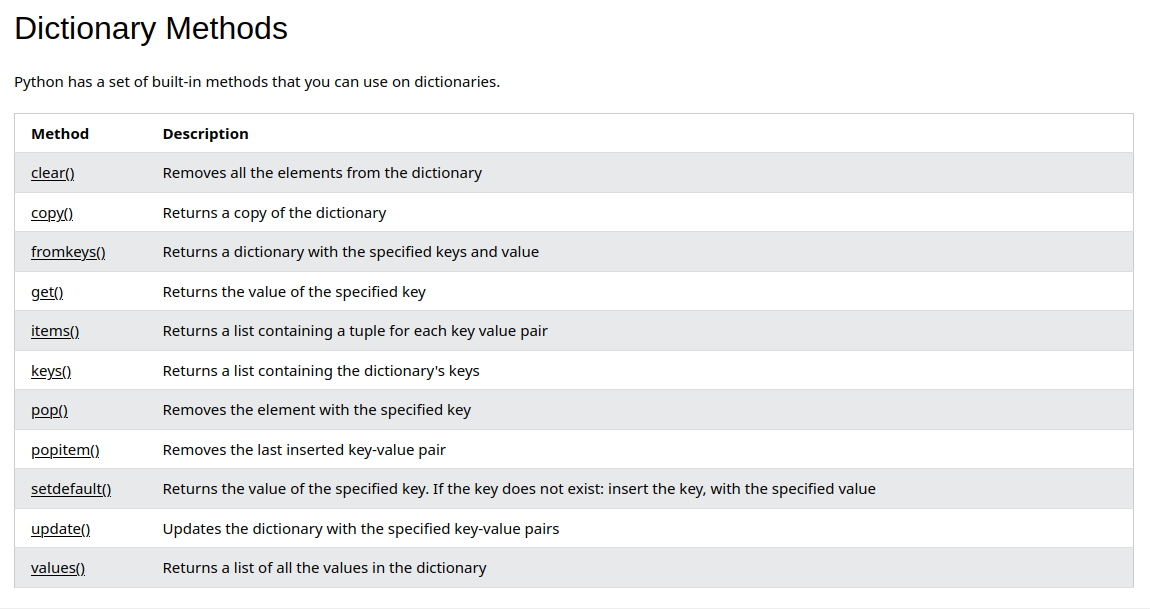
The items() method will return each item in a dictionary, as tuples in a list.
thisdict = {
  "brand": "Ford",
  "model": "Mustang",
  "year": 1964
}

x = thisdict.items()

print(x)
# dict_items([('brand', 'Ford'), ('model', 'Mustang'), ('year', 1964)])
car = {
"brand": "Ford",
"model": "Mustang",
"year": 1964
}
x = car.items()
print(x) #before the change
car["year"] = 2020
print(x) #after the change
# dict_items([('brand', 'Ford'), ('model', 'Mustang'), ('year', 1964)])
# dict_items([('brand', 'Ford'), ('model', 'Mustang'), ('year', 2020)])thisdict = {
"brand": "Ford",
"model": "Mustang",
"year": 1964
}
if "model" in thisdict:
print("Yes, 'model' is one of the keys in the thisdict dictionary")
# Yes, 'model' is one of the keys in the thisdict dictionaryChange Values
thisdict =	{
  "brand": "Ford",
  "model": "Mustang",
  "year": 1964
}

thisdict["year"] = 2018

print(thisdict)

# {'brand': 'Ford', 'model': 'Mustang', 'year': 2018}
thisdict = {
"brand": "Ford",
"model": "Mustang",
"year": 1964
}
thisdict.update({"year": 2020})
print(thisdict)
# {'brand': 'Ford', 'model': 'Mustang', 'year': 2020}