Use of binding schedular
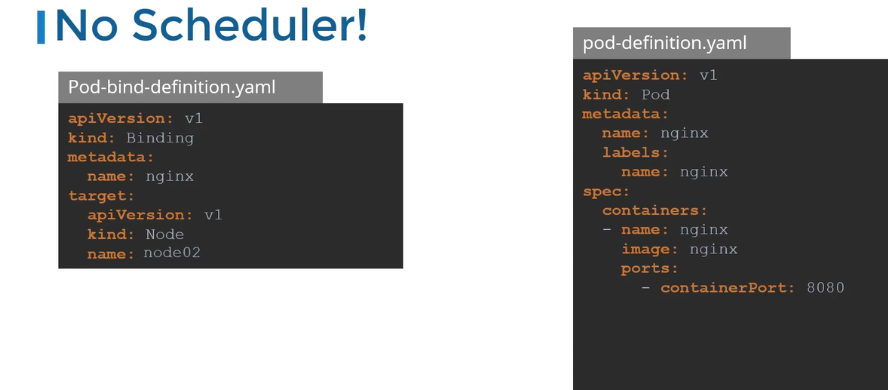
In Kubernetes (K8s), ==schedulers are responsible for assigning pods to the most appropriate nodes in the cluster==. The default scheduler is built-in, but you can also implement custom schedulers, including a manual scheduler. Here’s an overview of both:
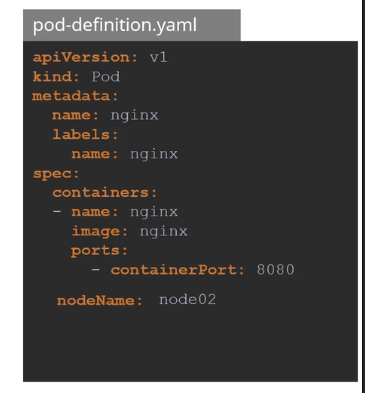
1. Manual Scheduler:
-
Definition: As the name suggests, the user manually selects a node for the pod to run on.
-
How: Specify the node name in the pod spec (
nodeNamefield). -
Use Case: Useful in testing or small setups where you want full control over node selection.
-
YAML Example:
apiVersion: v1 kind: Pod metadata: name: manual-pod spec: containers: - name: nginx image: nginx nodeName: worker-node1 -
Drawback: Doesn’t scale well in large clusters, prone to human error.
2. Default Scheduler:
- Definition: The built-in Kubernetes scheduler that automatically assigns pods to nodes based on resource requests and other constraints (e.g., CPU, memory).
- How: Automatically selects nodes based on available resources and other policies.
- Use Case: Most common, handles most scheduling requirements in production.
- Factors Considered:
- Resource requests and limits (CPU, memory).
- Node availability.
- Taints and tolerations.
- Affinity and anti-affinity rules.
- Node selectors.
3. Custom Scheduler:
- Definition: Custom schedulers allow you to create specialized scheduling logic using your algorithms.
- How: You define custom logic to assign pods to nodes (often using a custom controller).
- Use Case: Needed in very specific use cases where default logic doesn’t suffice (e.g., custom resource optimization).
- Example: Scheduling for GPUs or specific latency-sensitive workloads.
4. Multiple Schedulers:
-
Definition: You can deploy and configure multiple schedulers in the same cluster.
-
How: Pods can use the
schedulerNamefield to specify which scheduler to use. -
Use Case: Useful if different teams or workloads require different scheduling strategies.
-
YAML Example:
apiVersion: v1
kind: Pod
metadata:
  name: custom-scheduler-pod
spec:
  schedulerName: my-custom-scheduler
  containers:
  - name: nginx
    image: nginx
Key Points for CKA:
- Understand how the default scheduler works and the factors affecting it.
- Practice using manual scheduling and node selectors.
- Be familiar with how to implement custom schedulers using
schedulerName.
Real-world Use Cases:
- Default scheduler handles most cases, scaling across multiple nodes.
- Custom schedulers are used for specific needs (e.g., workload balancing, latency-sensitive apps).
Tips:
- Use node taints and tolerations to control pod placement effectively.
- Use node affinity/anti-affinity to manage pod distribution across nodes.
- Avoid manual scheduling in large environments to minimize human errors.
Let me know if you’d like more detail on any of these!