In Kubernetes, labels and selectors are fundamental for organizing, grouping, and managing resources like pods, nodes, and services. They help manage large, complex systems by enabling the selection and filtering of resources based on key-value pairs.
1. Labels:
-
Definition: Key-value pairs attached to resources (pods, nodes, etc.) that help in identification, grouping, and filtering.
-
Purpose: Organize, classify, and manage objects (e.g., assigning environments like
prod,dev, etc.). -
Syntax:
metadata: labels: app: nginx environment: production tier: frontend -
Use Case: Used by services, deployments, and selectors to target specific pods or nodes.
2. Selectors:
- Definition: Used to filter or select objects based on labels. Selectors help resources (like services, deployments) find and manage pods based on labels.
- Types of Selectors:
- Equality-Based: Matches resources with specific labels.
- Set-Based: Matches resources with labels that are part of a set (e.g., IN, NOTIN).
3. Types of Label Selectors:
a. Equality-Based Selectors:
-
Syntax:
key = valueorkey != value -
Example:
selector: matchLabels: app: nginx -
Use Case: Matches resources with a specific key-value pair (e.g., all pods with
app: nginx).
b. Set-Based Selectors:
-
Syntax:
IN,NOTIN,EXISTS,DOESNOTEXIST -
Example:
selector: matchExpressions: - key: environment operator: In values: ["production", "staging"] -
Use Case: Matches resources whose label values are part of a set (e.g., all pods with
environmentin["production", "staging"]).
4. Real-World Use Case:
-
Services: Services use selectors to identify the set of pods to route traffic to.
apiVersion: v1 kind: Service metadata: name: nginx-service spec: selector: app: nginx ports: - protocol: TCP port: 80 targetPort: 80 -
Deployments: Deployments use label selectors to decide which pods to manage and update.
-
Affinity Rules: Labels can be used to ensure that certain workloads (pods) are scheduled on specific nodes or node groups.
5. Best Practices:
- Use meaningful labels like
app,environment,tierto make resources easy to manage. - Use set-based selectors for more flexibility when filtering resources.
- Keep label keys consistent across your entire cluster for simplicity and better organization.
6. Key Points for CKA:
- Understand how selectors work in Deployments, Services, and DaemonSets.
- Practice label-based service discovery using services and pods.
- Be familiar with using label selectors for filtering resources (e.g.,
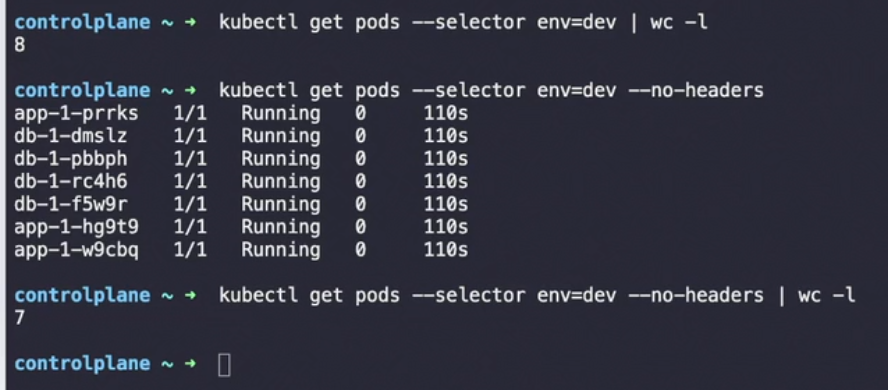
kubectl get pods --selector app=nginx).
Tip:
- Use
kubectl get pods --show-labelsto view all labels applied to pods. - Label your resources during creation using
kubectl createorkubectl labelfor existing resources.
Would you like an example of how to create resources with labels or selectors, or dive into more advanced topics like affinity/anti-affinity?
Use wordcount and no header in exams 👇