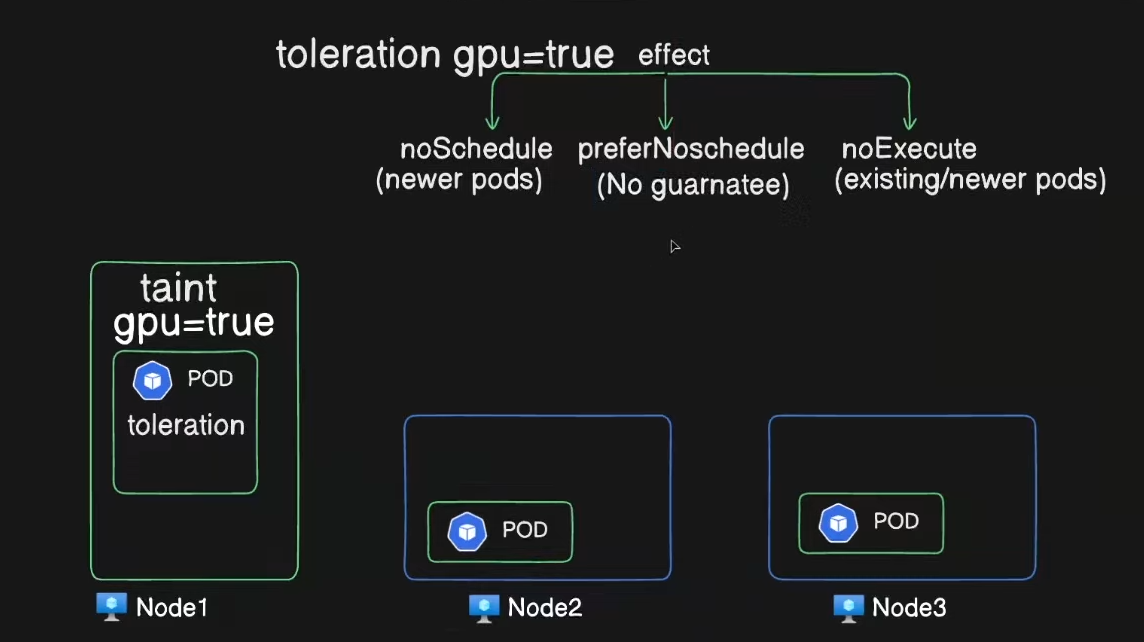
In Kubernetes, Taints and Tolerations work together to ensure that certain pods are only scheduled on specific nodes, or to prevent pods from being scheduled on unsuitable nodes.
Taints
- Taints are applied to nodes and indicate that the node is not able to schedule all pods.
- A taint consists of:
- A key (an identifier).
- A value (optional; further specifies the taint).
- An effect (specifies what happens to pods that don’t tolerate the taint).
The three effects a taint can have:
NoSchedule: Pods that don’t tolerate this taint will not be scheduled on this node.PreferNoSchedule: The system tries to avoid scheduling pods that don’t tolerate the taint on this node, but it’s not guaranteed.NoExecute: Pods that don’t tolerate this taint will be evicted from the node if they are already running.
Example of adding a taint to a node:
kubectl taint nodes <node-name> key=value:NoScheduleTolerations
- Tolerations are applied to pods and allow the pod to be scheduled on nodes with matching taints.
- They specify that the pod can “tolerate” the taint applied to a node, meaning the pod is allowed to be scheduled on the node despite the taint.
A toleration looks like this:
tolerations:
- key: "key"
  operator: "Equal"
  value: "value"
  effect: "NoSchedule"
How they work together:
- Nodes with a taint will repel pods that don’t have a matching toleration.
- Pods with a toleration can be scheduled on nodes with a corresponding taint.
Use Cases:
- Dedicated Nodes: You might want to reserve certain nodes for specific workloads, like GPU nodes or nodes with specific hardware.
- Evicting Unhealthy Pods: You can taint a node to evict all pods except those that tolerate the taint, such as for node maintenance.
Example:
-
Add a taint to a node:
kubectl taint nodes node1 special=true:NoScheduleNow, no pod can be scheduled on
node1unless it has a toleration for thespecial=truetaint. -
Apply a toleration to a pod:
apiVersion: v1
kind: Pod
metadata:
  name: my-pod
spec:
  containers:
  - name: nginx
    image: nginx
  tolerations:
  - key: "special"
    operator: "Equal"
    value: "true"
    effect: "NoSchedule"
This pod can now be scheduled on nodes with the special=true:NoSchedule taint.
Is there any specific example you’d like to dive into?